
Boss 10 Inch Radio: Bringing a Larger Display and Smarter Control to Your Dashboard
Discover how a 10-inch multimedia receiver can modernize your dashboard with a larger touchscreen, smartphone connectivity, convenient audio controls, navigation support, and improved entertainment options.

Boss 10 Inch Radio: Bringing a Larger Display and Smarter Control to Your Dashboard
A modern vehicle dashboard should provide convenient access to entertainment, communication, and essential driving information. Older factory stereos often have small displays and limited connectivity, making everyday tasks less convenient than they need to be. Upgrading to a larger multimedia receiver can create a more advanced cabin experience with improved screen visibility, accessible controls, and support for modern entertainment features.
A 10-inch display can also change the overall appearance of the dashboard. Its generous screen space offers room for navigation information, music controls, smartphone functions, and supported applications. However, the best upgrade is not simply the one with the biggest screen. Display performance, vehicle compatibility, audio features, and installation quality all contribute to a system that works well over time.
A New Approach to Dashboard Entertainment
A larger touchscreen gives drivers a more spacious interface for managing different multimedia functions. Instead of working with a compact display, users can access supported menus, audio sources, navigation information, and device settings through a wider viewing area.
This additional space can make icons easier to identify and information more comfortable to read. It can also give the dashboard a contemporary appearance, especially when the receiver's design complements the vehicle's interior.
Some multimedia receivers feature floating displays that extend outward from the dashboard, while others use integrated mounting arrangements. The right design depends on available space, screen positioning, and the vehicle's original dashboard layout.
Drivers should consider how the screen sits within the cabin. A display that blocks air vents, covers factory controls, or creates an uncomfortable viewing angle may reduce the benefits of upgrading.
What Makes a 10-inch BOSS touchscreen stereo Worth Considering?
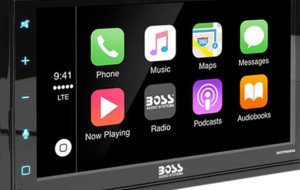
A 10-inch BOSS touchscreen stereo combines a recognizable automotive audio brand with a larger display format designed to provide convenient access to supported multimedia functions. Its appeal comes from bringing entertainment and selected connectivity features into one dashboard control center.
The larger screen can provide more room for visual information, while compatible connections may allow drivers to manage music, calls, and other smartphone-related functions. Depending on the specific model, available features may include Bluetooth, USB playback, radio reception, camera inputs, and smartphone integration.
The exact feature set varies between models, so buyers should review individual specifications rather than assume every receiver offers identical functions.
A useful system should make everyday operation straightforward. Drivers should be able to locate common settings, switch audio sources, and access compatible features without navigating through unnecessarily complicated menus.
Smartphone Connectivity for a More Connected Cabin
Smartphones have become an important part of everyday driving. Many people use them for music streaming, navigation, communication, and access to useful applications. A compatible multimedia receiver can make selected functions available through the dashboard.
Bluetooth connectivity is particularly useful for wireless audio playback and supported hands-free calling. USB connections may provide another way to connect compatible devices, play stored media, or charge a smartphone.
Some receivers also support smartphone projection platforms. These systems can display compatible applications through the multimedia interface, depending on the receiver, phone, and software requirements.
Before purchasing, examine these connectivity details:
-
Bluetooth support: Check whether the system supports audio streaming and hands-free calling.
-
USB connections: Confirm the available ports and their supported functions.
-
Smartphone compatibility: Verify whether the receiver supports the phone integration platform you intend to use.
-
Wireless functionality: Determine whether smartphone integration requires a cable or works wirelessly.
-
Microphone support: Check the included microphone arrangement and available connection options.
Reliable connectivity makes a multimedia receiver more useful, particularly for drivers who frequently listen to streaming services or use compatible navigation applications.
Display Technology and Comfortable Viewing
A larger display needs suitable visual performance to deliver a satisfying experience. Screen size determines the available viewing area, but clarity, brightness, and responsiveness influence how useful that space becomes.
Resolution: A clear display makes menus, icons, and supported visual content easier to recognize. Buyers should compare resolution alongside screen dimensions rather than assuming every large screen provides the same image quality.
Brightness: Dashboard lighting changes throughout the day. Adjustable brightness helps users maintain visibility in daylight and reduce excessive screen illumination at night.
Touch response: A responsive interface makes it easier to select menus and adjust settings. Delayed or inaccurate touch recognition can make daily operation frustrating.
Viewing angle: The screen should remain visible from the driver's normal seating position. Its mounting location and tilt can influence visibility.
Interface layout: Clear menus and recognizable icons make it easier to locate frequently used functions.
These details matter because drivers interact with the display regularly. A well-designed interface should simplify operation rather than create additional distractions.
Audio Features That Help Shape Your Listening Experience
A multimedia receiver is also an important part of the vehicle's sound system. Its audio settings can help drivers adjust playback according to their speakers, amplifiers, and personal listening preferences.
Depending on the model, available adjustments may include equalizer settings, balance and fader controls, tone adjustments, crossover options, and subwoofer level management.
For example, drivers with upgraded door speakers may adjust the equalizer to improve vocal clarity. Those using a dedicated subwoofer may benefit from suitable low-frequency settings that help balance bass with the rest of the music.
External amplifier compatibility is another important consideration. Buyers planning a more advanced audio system should check the receiver's preamp outputs, supported channels, and available audio adjustments.
A receiver cannot compensate for every weakness in an audio installation. Speaker quality, amplifier matching, wiring, enclosure design, and cabin acoustics all affect the final sound. Careful component selection and proper tuning remain essential.
Checking Vehicle Compatibility Before Buying
A larger multimedia receiver may require additional installation planning compared with a standard factory stereo. Dashboard openings, mounting depth, wiring connections, and electronic systems vary between vehicles.
Before selecting a model, check the following:
-
Dashboard dimensions: Confirm the available space and whether the receiver requires a specific mounting arrangement.
-
Screen clearance: Make sure the display will not interfere with vents, switches, or other dashboard controls.
-
Wiring harness: Identify the correct vehicle-specific harness and adapters.
-
Steering-wheel controls: Check whether an additional interface is required to retain factory buttons.
-
Camera compatibility: Confirm that the receiver supports the existing rearview camera or the camera you plan to install.
-
Factory amplifier connections: Determine whether the original amplifier can connect properly to the replacement receiver.
-
Dashboard trim: Check whether a compatible fascia or mounting kit is necessary.
Newer vehicles may use integrated infotainment electronics that connect to other cabin functions. A compatibility assessment helps prevent unexpected problems and reduces the risk of losing useful factory features.
Navigation and Camera Functions for Everyday Driving
Navigation support can make a larger display particularly practical. Compatible smartphone applications may show maps, directions, and route information through the dashboard, providing a more accessible viewing experience.
Camera support can also add convenience. A compatible rearview camera can display the area behind the vehicle when reversing, helping drivers check their surroundings. Some receivers support additional camera connections, although the number and type of inputs depend on the specific model.
Drivers replacing factory equipment should verify camera compatibility before purchasing. Certain vehicles use specialized connectors or signal formats that require an adapter to work with an aftermarket receiver.
These features can support everyday driving, but they should never replace direct observation, mirrors, or safe driving habits.
Installation Details That Should Not Be Overlooked
The quality of an installation has a direct impact on how well a multimedia system performs. Even a capable receiver can develop problems if the wiring is poorly connected, the mounting is unstable, or cables interfere with other dashboard components.
A proper installation should include secure mounting, suitable grounding, correct power connections, and organized cable routing. The installer should also check that the screen has adequate clearance and does not obstruct important vehicle controls.
After installation, test the major functions:
-
Confirm that the display powers on and responds correctly.
-
Pair a compatible smartphone and test Bluetooth playback.
-
Check radio reception and available media inputs.
-
Test every connected speaker for clear sound.
-
Verify supported camera and steering-wheel control functions.
-
Review the audio settings and screen brightness.
Professional installation is worth considering when the vehicle has complicated factory electronics or requires specialized adapters.
Choosing the Right Features for Your Needs
Not every driver needs the same multimedia features. Someone who frequently uses navigation may prioritize smartphone integration and screen visibility. A music enthusiast may focus on audio adjustments, amplifier connections, and subwoofer support. Another driver may care most about hands-free calling, camera compatibility, and a clean dashboard appearance.
Future upgrade plans should also influence the decision. If you intend to add aftermarket speakers or amplifiers later, checking the receiver's available audio connections can help avoid unnecessary replacements.
Compare the exact specifications, supported functions, and installation requirements of each model. A receiver that fits the vehicle and provides the features you regularly use will offer more practical value than one selected only because of its display size.
Giving Your Dashboard a Modern Upgrade
A larger multimedia receiver can make the dashboard more attractive while improving access to supported entertainment, smartphone connectivity, navigation, and audio controls. Its value comes from combining a spacious display with dependable performance and convenient everyday functions.
Before making a purchase, evaluate the vehicle's dashboard layout, wiring requirements, connectivity needs, and future audio plans. With the right receiver and a properly completed installation, drivers can create a more connected cabin and enjoy a practical foundation for additional car audio upgrades.










Comments
0 comment